




GeeSome Node allows you to run your own file storage with social media functional: make you own public or private group with posts and content. It's a Node on top of IPFS for define and manage data structure of files, users and groups. Node provides an UI and API for storing and accessing your saved data or remote data of other nodes: files, posts, groups.

GeeSome protocol created to provide communication tool between communities of property owners in Galt Project.
Galt Project team is aware of many cases of censorship and blocking in different social networks. These cases forced us to develop a new decentralized protocol and node application that would allow anyone to upload any content to his personal node and to share this content with the whole world without the risk of being blocked.
Using the GeeSome protocol, communities in the Galt Project should eventually be able to communicate in end-to-end encrypted chat groups, share images, video, text or any data. Chat group encryption is currently only a proof of concept; real security requires client-side encryption with user-held private keys and recipient public keys.
We are sure that this tool should be used not only by the project's communities, but also by anyone who is concerned about the safety of their data, censorship and blocking in web.
A new open protocol for unstopable social networking and communication on IPFS. It defines the structure of social network data to describe familiar to the modern user entities: content, posts, tags, groups.
GeeSome UI - it's Vue application, that using GeeSome node API for saving content and IPFS in-browser node for getting content. It's completly separated client from node and can be connected to any other GeeSome node. There are also many cases when it’s not necessary to use GeeSome UI. You can use GeeSome node API and GeesomeClient library in your project to build you own UI with some important features special for you.
With the help of GeeSome Node, anyone can create an instance of a decentralized social network, with groups like in YouTube, Instagram or Telegram but with content preservation and no locks or censorship thanks to the concept of personal GeeSome Node using IPFS Node to store content, access data and receive updates by libp2p.
GeeSome Node can be used:
- to create and maintain your blog and generate static site for blog
- to save important content like Saved messages in telegrams and / or in the form of a file structure as in Google Drive
- as a media platform for adding and viewing / listening to audio and video content, creating playlists
- to share the uploaded content in any form (blog, playlist, file, folder)
- to create groups and, after frontend E2EE work is complete, communicate with your friends in secure chats

You can run personal or public GeeSome node. It used for storing files, manage entities and prepare content for publishing. Also because of IPNS updates issues - GeeSome node have IPNS caching based on signed PubSub events. Also there is an issue about IPNS keys of user. Currently its storing in GeeSome node, but need to improve it.


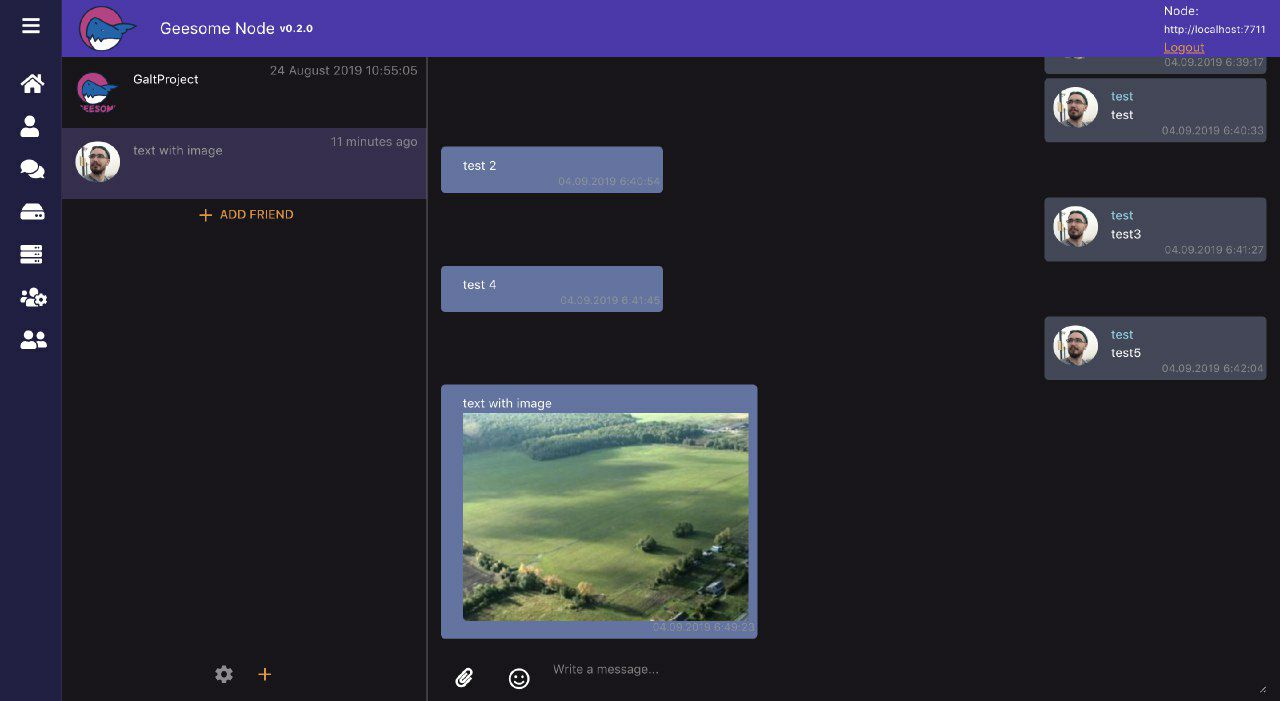
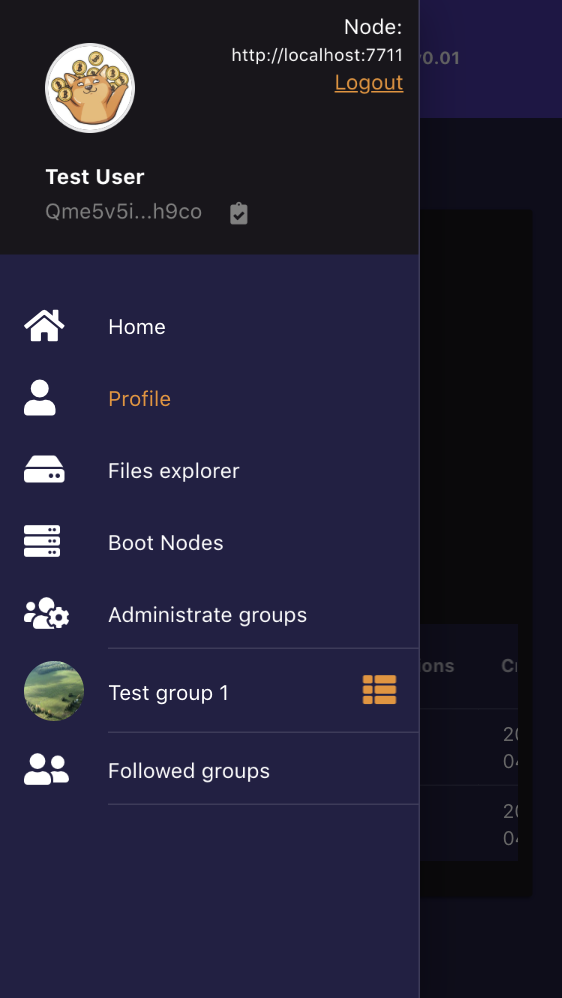
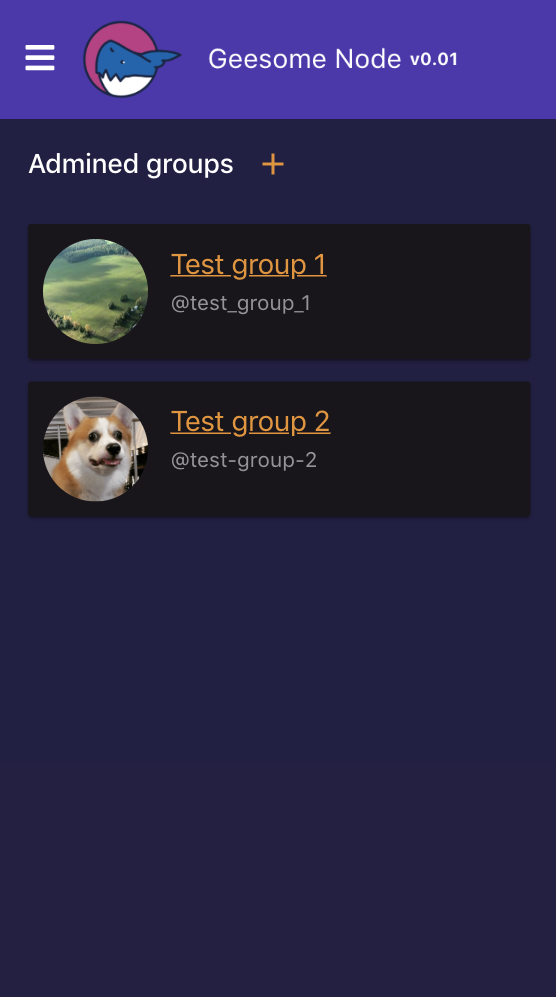
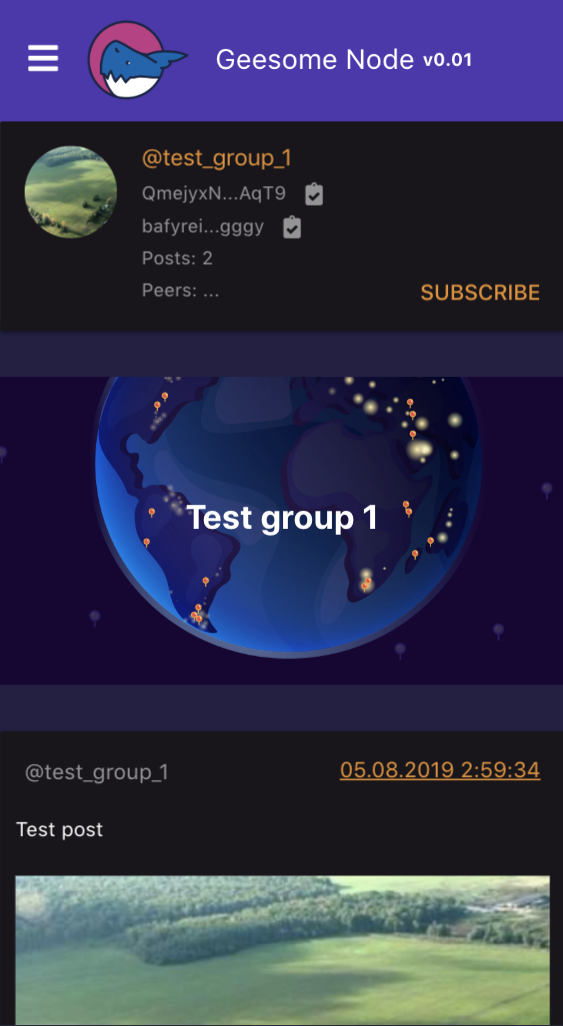
| Main page | Menu | Groups list | Group page |
|---|---|---|---|
 |
 |
 |
 |
- Set
ADNS record for yourgeesome.your-site.comdomain with ip address of server - [Recommended] If you want to use gateway - set
ADNS record for yourgateway.geesome.your-site.comdomain with ip address of server - Clone repo to server that bound to domain
git clone https://github.com/galtproject/geesome-node.git && cd geesome-node
- [Recommended] actions before install:
sudo SIZE=8G bash/ubuntu-init-swapfile.sh # Init 8GB Swapfile
sudo PORT=4242 bash/ubuntu-set-ssh-port.sh # Change SSH port to custom
- Run bash script with parameters: domain and email for letsencrypt
sudo chmod +x bash/*.sh && sudo bash/ubuntu-install-docker.sh
sudo DOMAIN=geesome.your-site.com EMAIL=your@email.com GATEWAY=1 bash/ubuntu-install-nginx.sh # add CF=1 before script to install for cloudflare
The Docker service runs bash/ipfs-ownership-preflight.sh before startup. It creates the mounted IPFS data directories for Kubo's ipfs user (1000:100) and conditionally repairs restored or upgraded repos whose config, repo.lock, datastore, or blocks ownership would otherwise crash-loop the IPFS container.
- Open
geesome.your-site.com/#/setupto create first admin user
If the server runs out of root disk space, mount a larger disk first, then move the heavy Docker storage with one command from the repo directory:
sudo bash/move-docker-storage.sh ipfs /mnt/geesome --yes      # creates /mnt/geesome/ipfs and /mnt/geesome/ipfs-staging
sudo bash/move-docker-storage.sh database /mnt/geesome --yes  # creates /mnt/geesome/postgres-data
sudo bash/move-docker-storage.sh all /mnt/geesome --yes       # creates all of the above
The /mnt/geesome argument is the parent directory, not the final data directory. The ipfs target moves STORAGE_DATA to /mnt/geesome/ipfs and STORAGE_STAGING to /mnt/geesome/ipfs-staging. The database target moves Postgres data to /mnt/geesome/postgres-data. The script stops the Docker stack before copying, copies and verifies the data, updates Docker Compose .env automatically, writes a geesome-docker systemd storage override when that service is installed, relinks the old paths, runs the IPFS ownership preflight when needed, and starts the stack again. Add --no-restart only if you want to leave the stack stopped after the move.
By default the old source directories are deleted after the stack starts successfully, freeing space on the original disk. Add --keep-source if you want rollback directories left as *.moved-<timestamp> backups instead.
Use this if your server has no domain and you want to reach the node by its IP address.
- Clone repo to server
git clone https://github.com/galtproject/geesome-node.git && cd geesome-node
- [Recommended] actions before install:
sudo SIZE=8G bash/ubuntu-init-swapfile.sh # Init 8GB Swapfile
sudo PORT=4242 bash/ubuntu-set-ssh-port.sh # Change SSH port to custom
- Install Docker and build/start the node:
sudo chmod +x bash/*.sh && sudo bash/ubuntu-install-docker.sh
- Configure nginx for IP access and create the first admin user:
bash/ubuntu-install-nginx-nodomain.sh
The script serves the node on http://<server-ip>/ (API proxied at http://<server-ip>/api/), waits for the node, prompts for the admin username, email and password, creates the first admin user, and prints the API auth token. Copy the token from the output — you can use it for API requests.
Note: the browser UI will not work over plain
http://<server-ip>. Chrome and other modern browsers restrict secure-context-only APIs (Web Crypto, service workers, etc.) that the GeeSome UI relies on to HTTPS origins (orlocalhost). The node and its HTTP API work fine over IP — this setup is intended for API/headless use or local access. To use the browser UI, install with a domain and TLS (see Install with domain) or tunnel the node tolocalhoston your own machine.
- Set
ADNS record for yourgateway.geesome.your-site.comdomain with ip address of server - Set
CNAMEDNS record for youryour-site.comorblog.your-site.com(for example) with gateway domain:gateway.geesome.your-site.com - Set
TXTDNS record for youryour-site.comorblog.your-site.com(for example) with IPFS or IPNS content:dnslink=/ipns/bafzbeidjvkkvlsfeko4s43lhvi3zd4phlkfoudhf6ygqatl4rrveigmdi4 - Run bash script with parameters: domain and email for letsencrypt
sudo DOMAIN=your-site.com EMAIL=your@email.com bash/ubuntu-cert-domain.sh
Note: You can generate a static site from Geesome groups by UI and get IPNS or IPFS of static sites for the gateway using.
npm run docker-upgrade
This runs bash/docker-rebuild-and-upgrade.sh: it pulls the latest source, rebuilds the Docker image, and restarts the geesome-docker systemd service.
The Docker rebuild keeps dependency and BuildKit caches warm, so source-only updates should not redownload packages. When the Docker builder supports external cache exports, the build also imports/exports .docker-build-cache; otherwise it falls back to normal Docker layer caching. If the first build fails, the script prunes Docker caches and retries once.
Warning: the upgrade script refuses to run with uncommitted local git changes. Commit or stash server-side edits before running it.
YouTube thumbnail and video import drivers use the local yt-dlp binary. Install yt-dlp on hosts that need YouTube imports, or set YT_DLP_BINARY=/path/to/yt-dlp before starting GeeSome Node.
Invite codes are generated as crypto-random base62 strings. The default length is 16 characters; set GEESOME_INVITE_CODE_LENGTH before startup to use a longer code. Values below 16 are ignored.
Logs are quiet by default. See DEBUG.md for debug namespaces, log flags, and memory profiling (including how to dump per-process memory to a file for sizing hardware requirements).
- Install GeeSome libs by npm:
npm i --save git://github.com/galtproject/geesome-libs.git
or yarn:
yarn add git://github.com/galtproject/geesome-libs.git
-
Checkout GeeSome API documentation
-
Get apiKey from node by api and login pass authorization:
const { GeesomeClient } = require('geesome-libs/src/GeesomeClient');

const geesomeClient = new GeesomeClient({
    server: 'https://your-site.com/api', // or 'http://localhost:2052', it can be set by default in geesome node frontend
    // apiKey: '4J1VYKW-ZP34Y0W-PREH1Q2-DYN9Q8E' // if you paste your apiKey here, so no need to authorization by loginPassword function
});

geesomeClient.init().then(async () => {
    await geesomeClient.loginPassword("username", "password");
    console.log('Congrats! You successfully authorized, your session api key:', geesomeClient.apiKey);
});
Or you can generate apiKey from UI in User Profile section by "Add api key" button.
More safer to use apiKey instead of login/password, because you can always disable it and create another if there is a leak.
- Init GeeSome client and save image to your IPFS node
geesomeClient.init().then(async () => {
    const contentObj = await geesomeClient.saveDataByUrl('https://picsum.photos/500/300.jpg');
    console.log('content ipfs', contentObj.storageId);
    console.log('content manifest ipld', contentObj.manifestStorageId);
});- Create group and publish post via API
geesomeClient.init().then(async () => {
    const avatarPhoto = await geesomeClient.saveDataByUrl('https://picsum.photos/500/300.jpg');

    const group = await geesomeClient.createGroup(testUser.id, { name: 'test', title: 'Test', avatarImageId: avatarPhoto.id });

    const groupIpns = group.manifestStaticStorageId;
    console.log('group manifest ipld', group.manifestStorageId);
    console.log('group manifest ipns that points to ipld', groupIpns);

    const postContent1 = await geesomeClient.saveContentData('My first post');
    const postContent2 = await geesomeClient.saveDataByUrl('https://picsum.photos/1000/500.jpg');

    await geesomeClient.createPost([postContent1.id, postContent2.id], { groupId: group.id, status: 'published' });

    // get published group from IPFS with posts

    // resolve IPNS first
    const updatedGroupIpld = await geesomeClient.resolveIpns(groupIpns);
    console.log('new group manifest ipld with first post', updatedGroupIpld);

    // get JSON content of group by IPLD
    const updatedGroupManifest = await geesomeClient.getObject(updatedGroupIpld);
    console.log('fetched group manifest', updatedGroupManifest);
    // or you can simply use geesomeClient.getGroup(groupIpns) for auto-resolve IPNS, get manifest with avatar and cover contents included

    // get posts one by one from group's posts tree
    geesomeClient.getGroupPostsAsync(
      updatedGroupIpld,
      {limit: 10, offset: 0, orderDir: 'desc'},
      function onItemCallback(fetchedPost) {
        console.log('fetchedPost', fetchedPost);
        console.log('fetchedPost contents array', fetchedPost.contents);
      },
      function onFinishCallback(postList) {
        console.log('postList', postList);
      }
    );
});- Create and publish IPFS site directory with content to IPNS
geesomeClient.init().then(async () => {
    await geesomeClient.saveDataByUrl('https://picsum.photos/500/300.jpg', {path: '/my-site/image.jpg'});

    await geesomeClient.saveContentData('<h1>Hello world!</h1> <img src="./image.jpg"/>', {path: '/my-site/index.html'});

    const mySiteFolder = await geesomeClient.getFileCatalogItemByPath('/my-site/', 'folder');

    const {storageId, staticId} = await geesomeClient.publishFolder(mySiteFolder.id);

    console.log(`check out by IPFS hash: ${geesomeClient.server}/ipfs/${storageId}/`); // for example: https://your-site.com:7722/ipfs/QmbDxAcbnSc5bgX77MgqqZ9bPVcczv5McZAYrWXoRxExi8/

    console.log(`check out by IPNS hash: ${geesomeClient.server}/ipns/${staticId}/`); // for example: https://your-site.com:7722/ipns/QmcqRcmu7p3UHkMPz8XJ886KPWbzxgpc9uNXy9GUDfUD87/

    // resolve IPNS by api:
    const resolvedStorageId = await geesomeClient.resolveIpns(staticId);

    console.log(storageId === resolvedStorageId); // true
});- Personal message encryption proof of concept; full secure chat groups still require frontend E2EE
- Public channels and posts
- Streamable media api(video and audio)
- Basic file manager
- User profile
- Api keys for access to all node features
- Api keys managment in UI
- Separated content and folders list and access by users
- Users upload limits
- IPNS caching for fast resolving
- IPFS and IPNS directories for HTML sites and more
- Ethereum authentication by signature
- Import telegram channel's posts
- Generate static sites from groups with posts and upload to IPFS
- Invite system for new users
- Auto-backup social networks channels(Telegram)
- Stabilize content serving, upload limits, client-disconnect stream cleanup, and high-CPU paths reported in open operational issues.
- Finish the existing Pinata/pinning path with manual and auto pin flows exposed cleanly in API/UI.
- API key permissions and expiration are enforced; keep extending scoped service-token tests as new integrations land.
- Run a focused security review of API authorization and encryption boundaries before expanding integrations and production E2EE.
- Keep shared package versions aligned across
geesome-node,geesome-libs, andgeesome-ui, while treating Vue/ethers/mime major-line differences as separate migrations. - Improve static-site generation options, favicon handling, and frontend build delivery by IPFS.
- Design real frontend E2EE for chat groups using user-held private keys, recipient/device public keys, and group key rotation.
- Integrate ActivityPub/Fediverse so GeeSome groups and posts can federate with compatible servers; the current MVP has public actor/outbox/post/follower/following/follow routes, signed inbound follow acceptance/cancellation/block handling, signed inbound flag-report storage plus admin listing/state updates, outbound follow request/follow-accept delivery queues, signed remote accept/reject response handling for outbound follows, local post ActivityPub object records, publish-time
Create(Note)delivery queues, shared-inbox remote object records for replies to known local objects and mentions of known local group actors, admin remote-object review with sanitized preview fields, accepted-review-gated post-draft projection and manual native-post creation from accepted public Notes with local reply threading, persistent review-state decisions, and review-state filtering, shared-inboxUpdate(Note),Delete, andUndo(Create)handling for cached remote objects, and a planned canonical rich-text format so raw HTML stays adapter output rather than native post source, with broader remote post update/delete handling still to finish. - Expand group views toward thread/feed use cases while preserving existing post/group APIs.
- Improve social backup/import workflows for Telegram and Twitter-compatible sources.
- Keep the completed large-group/database scalability baseline healthy with measured migrations, cursor/page-scoped reads, generated-output batching, migration-integrity verification, conservative content tombstone restore/purge routes, and canonical storage-object identity seeded by real producers such as GeeSome content manifests.
- Maintain the completed storage space analyzer and restored-database reports for file-catalog and group usage, with drilldowns into largest files, file types, duplicate/shared storage IDs, preview overhead, safe cleanup blockers, queued original/preview physical storage cleanup with retention/history, deterministic availability signals, bounded on-demand IPFS provider/stat inspection, and a separate IPFS popularity/availability tab for tuning from production observations.
- Keep protocol-scale work such as local IPNS accounts, PubSub modules, remote backup, Matrix/Filecoin integrations, and mobile/browser apps as separate epics.
See docs/todo.md for the issue-backed backlog snapshot and fast delivery plan.
You can develop your own GeeSome service in any programming language for extend GeeSome node functional by communication by API with api keys. Service can communicate with GeeSome node by http requests and PubSub events(in future) for uploading content, managing users and groups.
Existing services:
- GeeSome ETH Manager: Ethereum listener library for managing GeeSome node by Smart Contracts events: register users, set storage limits.
- System: Ubuntu 22.04 (Jammy) or newer
- RAM: 2 GB minimum (with swap), 4 GB recommended. Swap is required — the Docker image build and video transcoding spike memory; initialize it with
bash/ubuntu-init-swapfile.sh. Measured footprint: the node process peaks ~350 MB at startup and settles to ~300 MB; the whole stack (node + IPFS + Postgres) stayed under ~1.75 GB in light use. Concurrent video transcoding needs more headroom — prefer 4 GB. You can profile your own load with the memory tooling in DEBUG.md. - Disk: 1 GB free + space for your files (plus ~3–4 GB for Docker images)
- GO IPFS or IPFS JS
- Node 22.x
- Sqlite
- ffmpeg
- Cerbot(Letsencrypt)
sudo chmod +x bash/*.sh && sudo bash/ubuntu-install-docker.sh
npm run docker
Open UI page by url: http://localhost:2042
Api available by http://localhost:2052 endpoint.
For quick module checks, run the targeted Mocha command that matches the changed area, for example:
node --import tsx --experimental-global-customevent ./node_modules/.bin/mocha test/pinUnit.test.ts
For the full suite, use the Docker-backed flow as the primary verification path:
npm run test:docker
The default Docker test path is optimized for warm reruns while implementing. It reuses Docker dependency layers and keeps PostgreSQL/IPFS data between runs, while still rebuilding the source snapshot and starting the GeeSome test process fresh. Use it after ordinary source changes.
Use a cold reset when service state, generated data, package files, or Docker setup changed:
npm run test:docker:cold
When a Docker image has already been built and you need to rerun the exact same source snapshot, the fastest loop can skip the build check:
npm run test:docker:no-build
The Docker test flow builds a Node 22 test image with ffmpeg, starts PostgreSQL and IPFS through test/docker-compose.yml, waits for those services, generates deterministic media/archive fixtures under test/resources, then runs yarn test inside the test container. It sets STORAGE_SKIP_REMOTE_STOP=1 so app teardown between test cases does not shut down the shared Kubo test service.
- How to make the internet great again
- Signing and encrypt messages by IPNS keys (Soon...)
- How to add site to IPFS with GeeSome node (Soon...)
- Use GeeSome as IPFS file storage in your decentralized project (Soon...)
- IPNS updates problem and how we solved it (Soon...)
- Are we ready for true decentralized messages and content? (Soon...)
- We need backups for our Social Networks! (Soon...)
Put a star and fork it. Join Us On Telegram. Thank you!