


A rich text editor for Panel whose value is markdown, powered by EasyMDE.
pn.widgets.TextEditor is Quill-based and gives you HTML, with no way to write a table. MarkdownEditor reads and writes markdown source instead, so the editor, the rendered output and anything else that touches the text all agree on one format.
- Markdown in, markdown out -
valueis the markdown source, synced on every keystroke - A toolbar with tables - bold, italic, headings, lists, links, images, tables, undo/redo and more
- Caret-safe programmatic writes - appending to
valuefrom Python keeps the caret, selection, scroll position and undo history intact - Paste and drop uploads - hand pasted or dropped files to a Python handler, return a URL and it lands in the document as an image, a media tag or a link
- Live preview - optional, rendered by Panel's own markdown-it pane so it matches every other markdown surface in your app, with a draggable divider
- Self-contained - the script, stylesheet and icons ship with the package, so nothing is fetched from a third-party CDN at runtime
- Works in shadow roots and dialogs - inline SVG icons need no
@font-face, and the editor re-measures itself when it is attached after render
Install via pip:
pip install panel-mdeOr via conda:
conda install -c conda-forge panel-mdeimport panel as pn
from panel_mde import MarkdownEditor
pn.extension()
editor = MarkdownEditor(
value="# Sprint notes\n\nMarkdown **in**, markdown **out**.",
preview=True,
status_bar=True,
sizing_mode="stretch_width",
height=430,
)
editor.servable()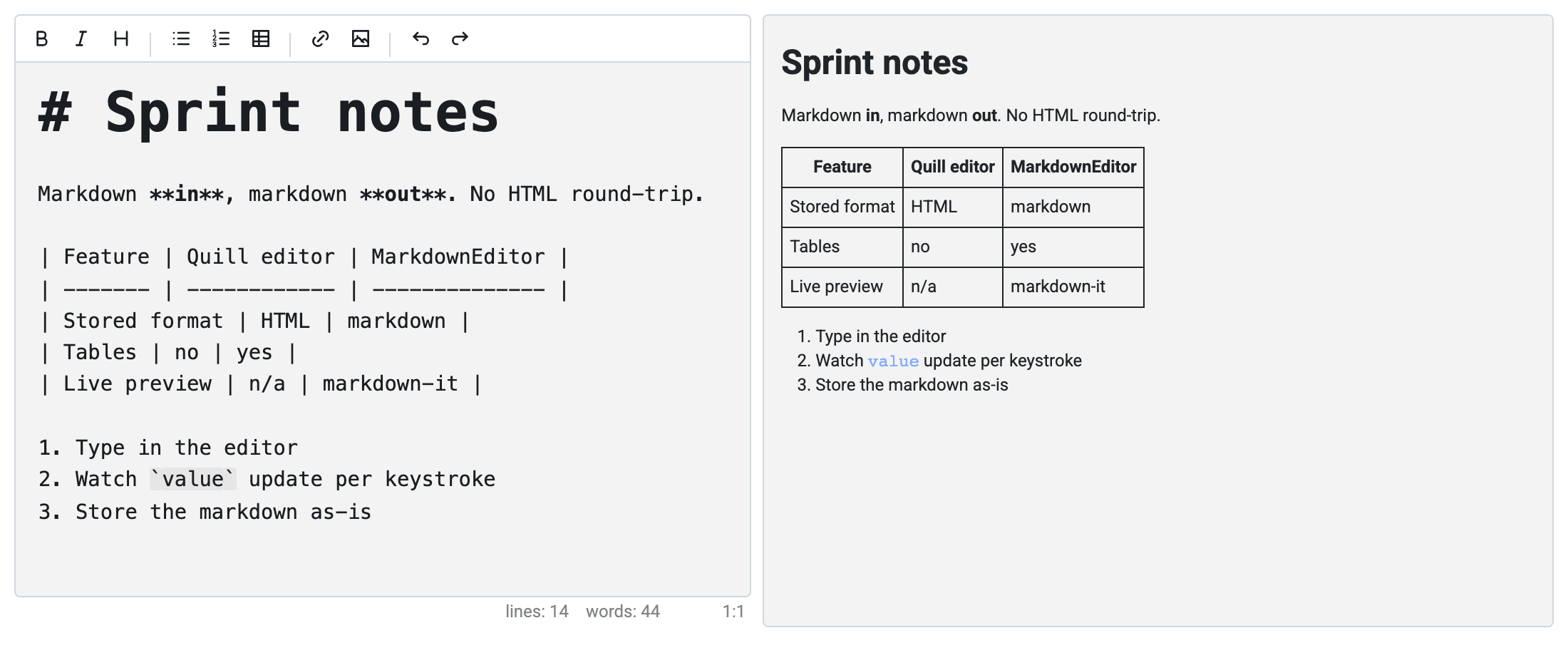
value updates on every keystroke, so a watcher (or a reactive expression) sees the text as it is typed:
import panel as pn
from panel_mde import MarkdownEditor

pn.extension()

editor = MarkdownEditor(value="# Title", height=300)
words = pn.pane.Markdown(editor.param.value.rx.pipe(lambda md: f"{len(md.split())} words"))

pn.Row(editor, words).servable()
Pass on_keyup=False to defer value until the editor loses focus or the user presses Ctrl/Cmd+Enter, the same contract as pn.widgets.TextInput. value_input always tracks the live text.
Writing value from Python applies the smallest edit that produces the new text, so an append from an upload flow does not disturb the person editing:
import panel as pn
from panel_mde import MarkdownEditor
pn.extension()
editor = MarkdownEditor(value="# Trip report\n\nWe left early.", height=300)
upload = pn.widgets.FileInput(accept=".png,.jpg")
def add_image(event):
url = store(event.new) # your own storage
editor.value += f"\n\n\n"
upload.param.watch(add_image, "value")
pn.Row(editor, upload).servable()The caret stays where it was, a selection survives, the view does not scroll and undo still walks back through what the user typed.
An upload_handler receives every file pasted or dropped into the editor, stores it wherever you like and returns the URL it is served from:
from pathlib import Path

import panel as pn

from panel_mde import MarkdownEditor

pn.extension()

MEDIA = Path("media")
MEDIA.mkdir(exist_ok=True)


def store(file):
    # file.name, file.mime_type, file.size and file.data (bytes)
    (MEDIA / file.name).write_bytes(file.data)
    return f"/media/{file.name}"


editor = MarkdownEditor(
    upload_handler=store,
    accepted_filetypes=["image/*", "video/*", "audio/*"],
    height=400,
)

pn.serve(editor, static_dirs={"media": str(MEDIA)})
The URL is formatted by the type of the file:  for an image, <video src="url" controls></video> or <audio src="url" controls></audio> for media, and [name](url) for anything else. Return a markdown or HTML snippet instead to control the insertion yourself, or None to reject the file. The handler may be a coroutine function, and value only changes once it returns: until then the editor marks the spot the file will land in, and the marker follows the text the user keeps typing.
accepted_filetypes and max_upload_size (10MB by default) are applied in the browser and re-applied on the server, so a rejected file never reaches the handler.
from panel_mde import MarkdownEditor

MarkdownEditor(
    toolbar=["bold", "italic", "heading", "|",
             "unordered-list", "ordered-list", "table", "|",
             "link", "image", "|", "undo", "redo"],
)
toolbar=True renders the set above, toolbar=False hides the toolbar, and "|" inserts a separator. panel_mde.TOOLBAR_ACTIONS lists every available action:
bold, italic, strikethrough, heading, heading-smaller, heading-bigger, heading-1, heading-2, heading-3, code, quote, unordered-list, ordered-list, check-list, clean-block, link, image, table, horizontal-rule, undo, redo, preview.
An unknown action raises ValueError rather than silently disappearing.
from panel_mde import MarkdownEditor

MarkdownEditor(value="# Title", preview=True, preview_location="bottom", height=500)
The editor and the preview split the space evenly, and the divider between them can be dragged to give either side more room (double-click resets it). The preview renders through pn.pane.Markdown, so it uses markdown-it with your app's own extensions. EasyMDE's bundled marked.js preview is never used, because it renders subtly differently from every other markdown surface in a Panel app. Add "preview" to the toolbar to let the user toggle it, or restyle it by assigning your own pane to preview_pane.
CodeMirror measures a detached element as zero-size, which is why some editors come up blank inside a dialog. MarkdownEditor re-measures on render, layout and resize, so it needs no help from the surrounding app:
import panel as pn
from panel_mde import MarkdownEditor

pn.extension()

editor = MarkdownEditor(value="# Notes", height=300)
card = pn.Card(editor, title="Notes", collapsed=True)

card.servable()| Parameter | Type | Default | Description |
|---|---|---|---|
value |
str | "" |
The markdown source. Updates per keystroke unless on_keyup is disabled |
value_input |
str | "" |
The markdown source, always updated per keystroke |
on_keyup |
bool | True |
Whether value updates per keystroke or on blur |
upload_handler |
callable | None |
Called with an UploadedFile when a file is pasted or dropped; returns a URL, a snippet or None |
accepted_filetypes |
list | [] |
MIME types, wildcards or extensions an upload accepts; empty accepts everything |
max_upload_size |
int | 10_000_000 |
Largest pasted or dropped file in bytes; None disables the check |
toolbar |
bool | list | True |
The formatting toolbar: True, False or a list of actions |
preview |
bool | False |
Show the live preview |
preview_location |
str | "right" |
"right" or "bottom" |
preview_pane |
Markdown | None |
The pane rendering the preview, created on demand |
autofocus |
bool | False |
Focus the editor on initial render |
disabled |
bool | False |
Make the editor read-only |
placeholder |
str | "" |
Text shown while the editor is empty |
line_numbers |
bool | False |
Show line numbers in the gutter |
line_wrapping |
bool | True |
Wrap long lines instead of scrolling horizontally |
indent_with_tabs |
bool | False |
Indent with a tab character rather than spaces |
tab_size |
int | 2 |
Spaces per indent level |
spellcheck |
bool | True |
Use the browser's native spell checker |
status_bar |
bool | False |
Show the line, word and cursor counts |
unordered_list_style |
str | "-" |
Bullet marker: "-", "*" or "+" |
Everything the editor needs is served by the Panel server itself. The EasyMDE bundle is compiled into the package, its stylesheet is vendored, and the toolbar icons are inline SVG. EasyMDE's two runtime downloads are both disabled: the Font Awesome icon font (replaced by the inline SVG) and the spell-check dictionaries (replaced by the browser's own checker). Inline SVG inherits currentColor, so the icons also render correctly inside the shadow root Panel gives every component, with no document-level @font-face registration.
This project is managed by pixi.
git clone https://github.com/panel-extensions/panel-mde
cd panel-mde

pixi run pre-commit-install
pixi run postinstall
pixi run compile
pixi run testThe ESM in src/panel_mde/models/ imports EasyMDE, which panel compile bundles into src/panel_mde/dist/:
pixi run compile        # one-off build
pixi run compile-dev    # rebuild on change
The vendored EasyMDE stylesheet is generated from the pinned npm version, with its @font-face rules and icon-font references stripped:
pixi run vendor-csspixi run test # unit tests
pixi run -e test-ui test-ui # Playwright UI testspanel serve examples/apps/notes.py examples/apps/uploads.py \
--static-dirs media=examples/apps/media --devuploads.py stores what you paste or drop in examples/apps/media, which is why it needs the static directory.
The documentation is built with Zensical:
pixi run -e docs docs-serve    # live-reloading preview
pixi run -e docs docs-build # build into builtdocs/Before committing the first time please install pre-commit:
pip install pre-commit
pre-commit installContributions are welcome! Please feel free to submit a Pull Request.
See LICENSE file for details.