Conversation


Adds Automated Access (docs/using-source/automated-access.md), the guide for software that reaches Source Cooperative with nobody at the keyboard: what a service account is; creating one and granting it products; issuing an API key and the five variables the AWS CLI or an SDK needs to exchange it at the data proxy; the refusal users see and the request id to quote; keeping the key out of URLs and debug output; rotation and editable expiry; tools that keep their first credentials; GDAL; revocation, the emergency stop and revoking a found key; and GitHub Actions as coming soon. The page is added to sidebars.ts.

Upload Your Data's Option 3 walked through trusting an IAM role in the uploader's own AWS account to write straight to Source's bucket. Service accounts supersede it, so the section is now a pointer to the new page, as are the two references to it earlier on that page and the "contact us" line for automated access. Access Data gains one sentence pointing unattended software at service accounts.

Co-Authored-By: Claude Opus 5.5 <noreply@anthropic.com>
Claude-Session: https://claude.ai/code/session_01R1eiTse4416N6uTgAy4Ddd

|
The latest updates on your projects. Learn more about Vercel for GitHub.
|



…accounts (#570) Closes #548. Closes #546. API keys are the second Integration type beside the GitHub trusts #567 shipped, and #566 replaced proof of control with per-account trust. The `source.coop` half of #548. Part of #491. **Merge order:** this can merge and deploy before the proxy. It no longer calls the proxy; the proxy calls it. source-cooperative/data.source.coop#235 is the proxy half and needs the route here to be live, or every key exchange fails closed. ## What API keys for environments without OIDC — a server, a scheduler, an instrument — per ADR-013 as revised in source-cooperative/data.source.coop#234: **a key is an opaque secret that source.coop resolves by hash; nothing signs it.** Six commits on `main`: the original feature, dropping the Ory-id guard once #567 namespaced service-account ids, #580's rework to opaque keys, the key hint, a calmer key list, and that list as its own component with stories. **The key** is `sck_` + 32 random bytes in base64url: a fixed 47 characters, all entropy after the prefix, matching `sck_[A-Za-z0-9_-]{43}`, which is what gets registered with secret scanners (#561). It is shown once and never stored. **The record** (`service-account-keys` table) is keyed by the key's hex SHA-256, with a public `key_id` (a UUID) for listing, revoking and changing expiry, a label, who issued it and when, an optional expiry, `revoked_at` and `last_used_at`. `publicKey()` strips the hash before any record reaches a client component. **The hint**: the record also keeps the key's last four characters, and the key list shows each key as `sck_…Xy9Q`, so someone holding a key can tell which record, and so which service account, it is. Four characters are 24 of the key's 256 random bits, leaving far too many to guess. The hint only confirms a key in hand against its record; it is never used to look a key up, since keys across the platform will share it. The issue dialog says how the new key will be listed. Keys issued before the hint existed are listed without one. **Issuing** (`issueApiKey`): whoever manages the service account gives a label and an expiry (30/90/365 days, or never). The action generates the key, writes the record and returns the key once. A disabled service account is refused. **Revoking** sets `revoked_at`; **expiry** can be changed after issuance, including to never. **Exchanging**: `POST /api/v1/service-account-keys/exchanges` with `{key_hash}` is what the proxy calls at `/.sts` when a key is presented, authenticated as the proxy itself (`verifyProxyAssertion`, sentinel subject `urn:source:data-proxy`, recorded in the ADR-005 amendment in source-cooperative/data.source.coop#234). It always answers 200 with `{account_id, key_id, active}`. `active` means known, not revoked, not expired, and its service account not disabled; an unknown hash is answered as inactive, indistinguishable from a revoked one. It records last use. The proxy caches the answer for 60s, so revocation takes effect for new exchanges within that time; credentials already issued live to their session cap. **Resolving the subject**: after an exchange, the proxy's credentials name the service account itself, and `authenticateWithOidcToken` resolves it with `fetchByOryId`, then a service account by id. No service account's id can be someone's Ory identity id: #567 namespaces it as `{owner}--{id}`, and a UUID never contains `--`. **UI**: the service account's page (#567's `ServiceAccountDetail`) has an API keys section, rendered by `ApiKeyList`, a row per key. On the left, the label with a Revoked or Expired marker, and the key's hint beneath. On the right, two short lines: how it has been used ("Used 3 days ago", "Never used") and when it ends ("Expires in 5 months", "Never expires", "Revoked 9 months ago"). The exact dates, and who issued the key and when, are in their tooltip. Change expiry and Revoke are in a "⋯" menu; a revoked key has none, and keeps an invisible copy of the button so its lines align. The section header carries `IssueApiKeyDialog`, which shows the key once with a copy button, and the environment variables that point any AWS SDK or the AWS CLI at the proxy. The list row counts live keys as a way to sign in. 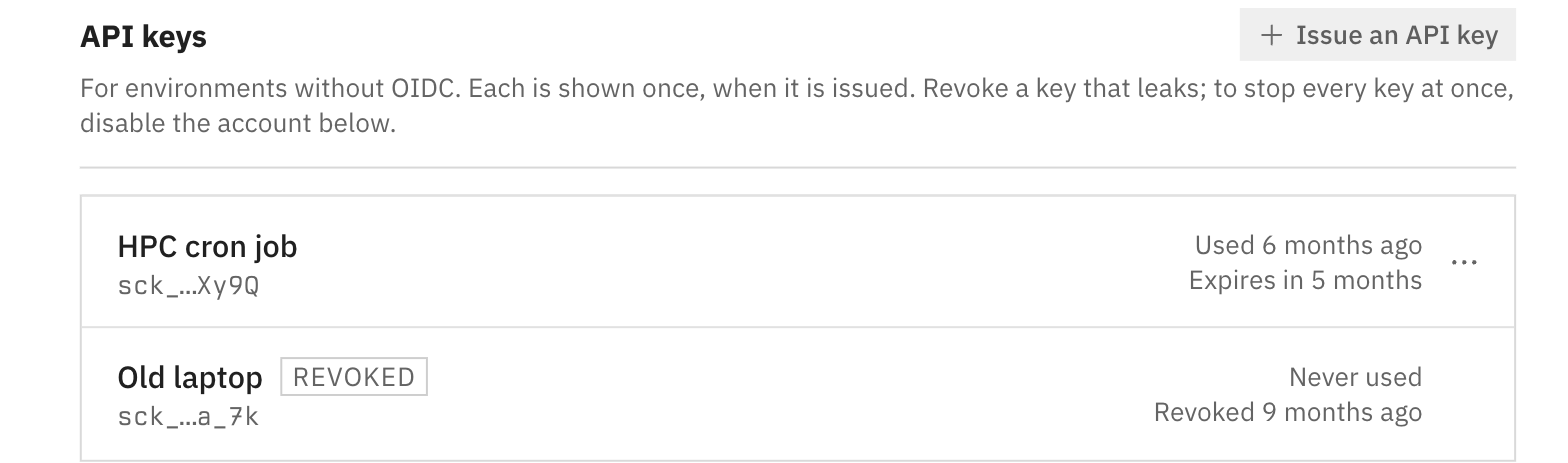 Every state a key can be in, from `ApiKeyList`'s Default story: 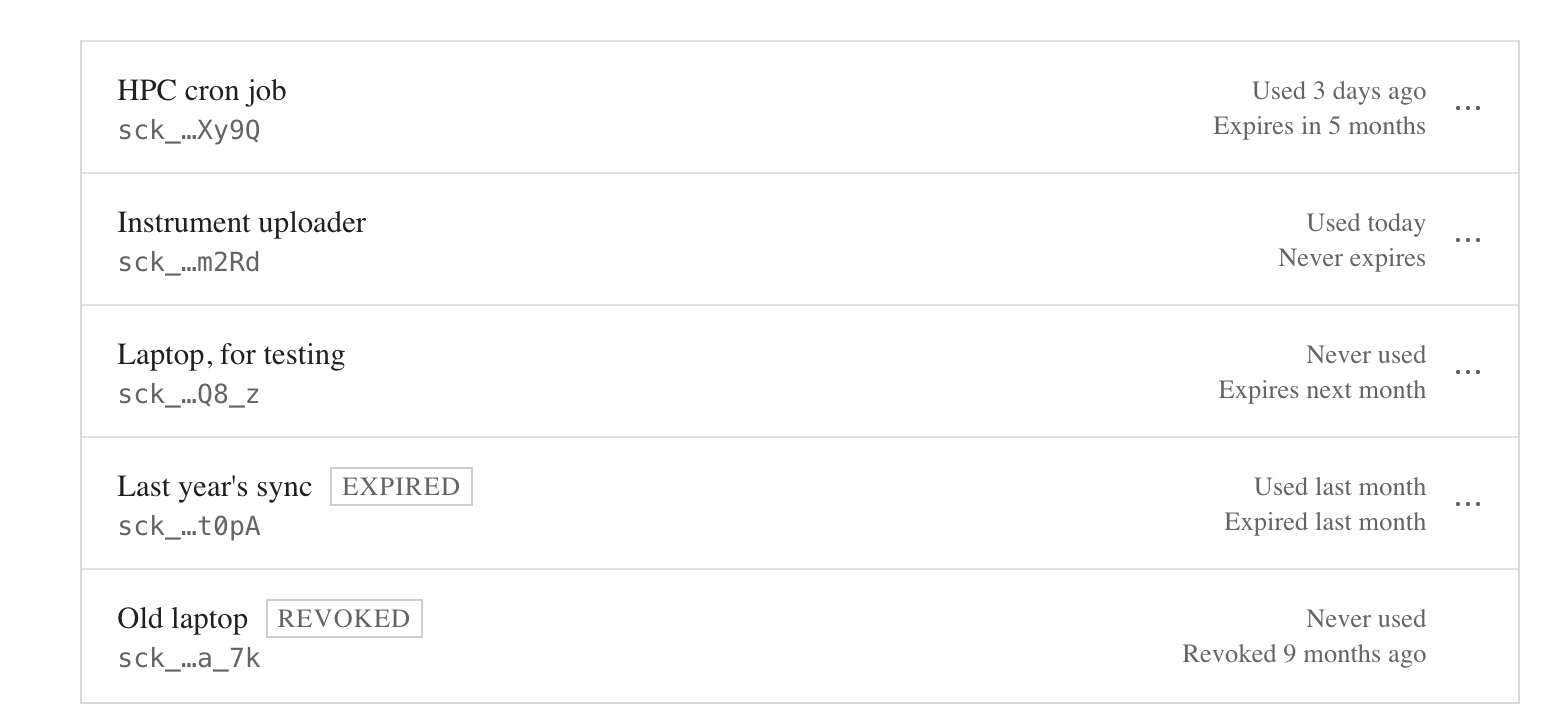 ## Stories - `ApiKeyList` › **Default** (every key state), **Single**, **WithoutHint**, **Empty** — https://source-coop-ui-git-feat-service-account-keys-radiantearth.vercel.app/?path=/story/features-service-accounts-apikeylist--default (dates are set relative to today; hover a row's dates for the exact ones) - `ServiceAccountDetail` › **Default** — https://source-coop-ui-git-feat-service-account-keys-radiantearth.vercel.app/?path=/story/features-service-accounts-serviceaccountdetail--default - `ServiceAccountList` › **Default** — https://source-coop-ui-git-feat-service-account-keys-radiantearth.vercel.app/?path=/story/features-service-accounts-serviceaccountlist--default - `IssueApiKeyDialog` › **Default** — https://source-coop-ui-git-feat-service-account-keys-radiantearth.vercel.app/?path=/story/features-service-accounts-issueapikeydialog--default (submitting reaches the show-once view with the hint line) - `ApiKeyExpiryField` — https://source-coop-ui-git-feat-service-account-keys-radiantearth.vercel.app/?path=/story/features-service-accounts-apikeyexpiryfield--default ## Testing - `npx jest` — 79 suites, 835 tests, all pass on the branch as rebased onto `main`. `service-account-keys.test.ts` covers issuing (the record holds the hash, never the key; the hint is the key's last four characters; the key is returned once), no-expiry keys, refusals before any write, revoking only own keys, and expiry changes including to never. The exchanges route test covers the proxy-only auth, active and inactive answers, and last-use recording. - `npm run type-check`, `next lint`, `npm run build-storybook` — clean. ## Docs and ADRs data.source.coop: this implements ADR-013 as revised in source-cooperative/data.source.coop#234, with ADR-014 from source-cooperative/data.source.coop#232; the proxy side is source-cooperative/data.source.coop#235, which supersedes source-cooperative/data.source.coop#233. The hint is a display detail the ADR doesn't need. docs.source.coop: the unattended-workflow guide, source-cooperative/docs.source.coop#37 for source-cooperative/docs.source.coop#34, should mention matching a key to its account by its last four characters. 🤖 Generated with [Claude Code](https://claude.com/claude-code) --------- Co-authored-by: Claude Fable 5.1 <noreply@anthropic.com>
An API key now ends in a six-character checksum of the rest (ADR-013, source-cooperative/data.source.coop#242), so the data proxy and the Source CLI refuse a key that was cut short or mistyped before anything is looked up, with "API key is malformed; check that it was copied whole". The guide's "If the key is refused" section shows that error and what to do about it, and no longer says a value that isn't a key gets "API key was not accepted".

Co-Authored-By: Claude Opus 5.5 <noreply@anthropic.com>
Claude-Session: https://claude.ai/code/session_01R1eiTse4416N6uTgAy4Ddd

## What I'm changing
A service-account API key now ends in a checksum. It is `sck_`, 30
random base62 characters, and six more that are the CRC-32 of those 30
(IEEE, as zlib computes it) written in base62: a fixed 40 characters
matching `^sck_[0-9A-Za-z]{36}$`, in place of `sck_` and 43 base64url
characters. This is GitHub's own token layout (`ghp_` + 30 random + 6
checksum), and it is what ADR-013 now specifies
(source-cooperative/data.source.coop#242).
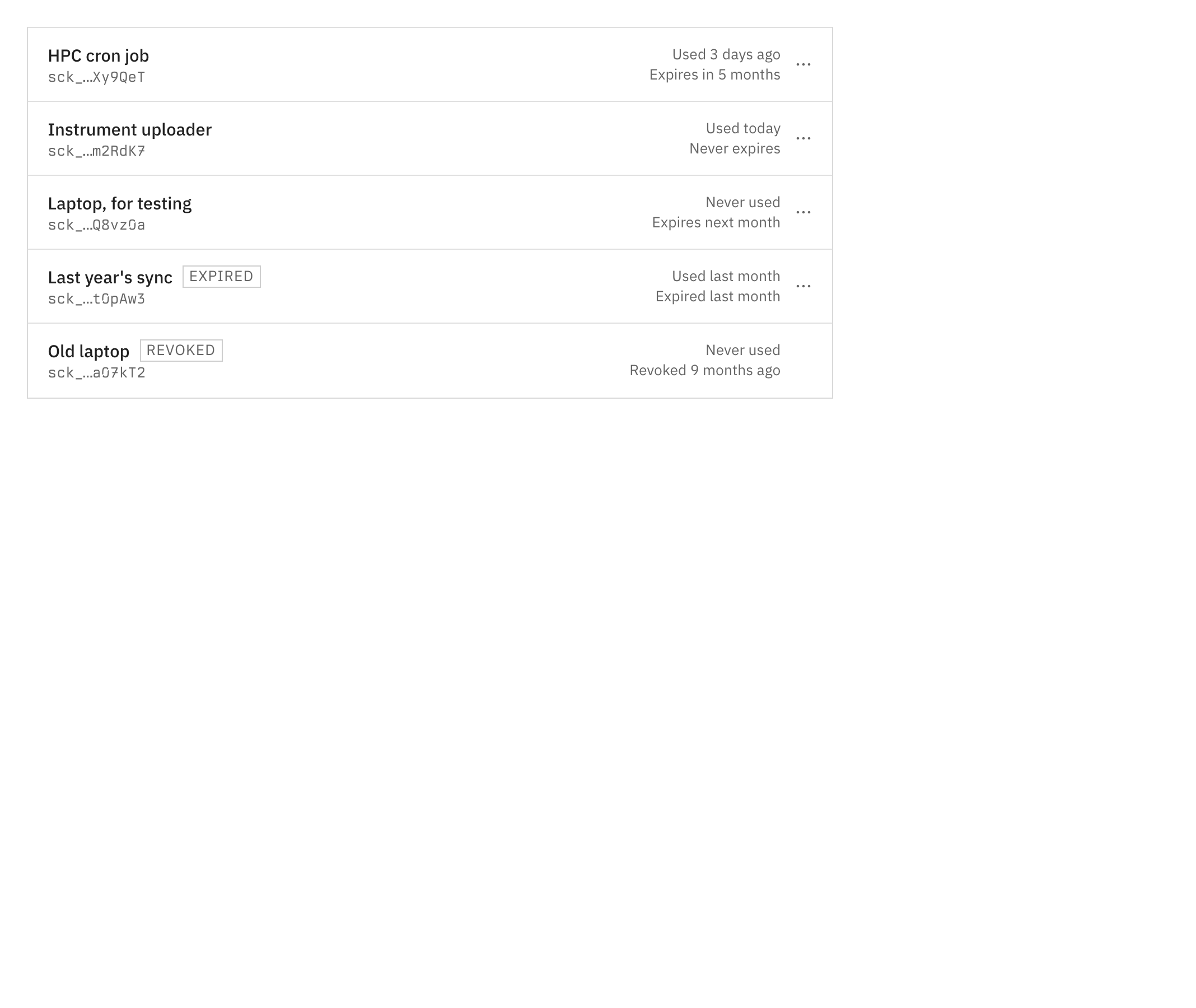
The hint a key is listed by becomes that checksum, the key's last six
characters (`sck_…Xy9QeT`), instead of its last four.
## Why
GitHub's [secret-scanning partner
program](https://docs.github.com/en/code-security/tutorials/secret-scanning-partner-program#identify-your-secrets-and-create-regular-expressions)
recommends a unique prefix, high entropy and a 32-bit checksum. With the
checksum, anything that holds a key — a scanner, the data proxy, the
Source CLI, #581's revocation routes — can tell it from a look-alike, a
truncated key or a mistyped one without a lookup, so a mistyped key gets
an error that says so instead of "not accepted". It adds no security:
anyone can compute a CRC-32. Base62 keeps `-` out of the key, so a
double-click selects all of it; about half of the base64url keys
contained one.
The random part is 178 bits, down from 256. The hash needs no salt at
that size and enumeration stays infeasible.
## How
- `src/types/service-account-key.ts` holds the whole format:
`API_KEY_PATTERN`, `API_KEY_ALPHABET`, `apiKeyChecksum` and `isApiKey`.
The CRC-32 is a few lines of TypeScript rather than `zlib.crc32` because
client components import this module and it is bundled for the browser.
- `issueApiKey` draws the 30 characters with `crypto.randomInt(62)`,
which is uniform, and appends their checksum.
- The hint is the checksum. Six base62 characters are a 32-bit
fingerprint where four were 24 bits, and a checksum of 178 random bits
narrows them by 32, which leaves far too many to guess. The schema still
accepts the four-character hints of keys issued before this change, so
their rows keep rendering.
- Tests and the Storybook mock build their keys at run time, so secret
scanners don't flag the files once the pattern is registered.
Keys issued since #570 merged are in the old format and will be refused
as malformed by the proxy. No deployed proxy can exchange a key yet
(source-cooperative/data.source.coop#235 is open), so none of them has
ever worked; their owners issue new ones.
## Stories
-
[ApiKeyList](https://source-coop-ui-git-feat-api-key-checksum-radiantearth.vercel.app/?path=/story/features-service-accounts-apikeylist--default):
each row's hint is the six-character checksum.
-
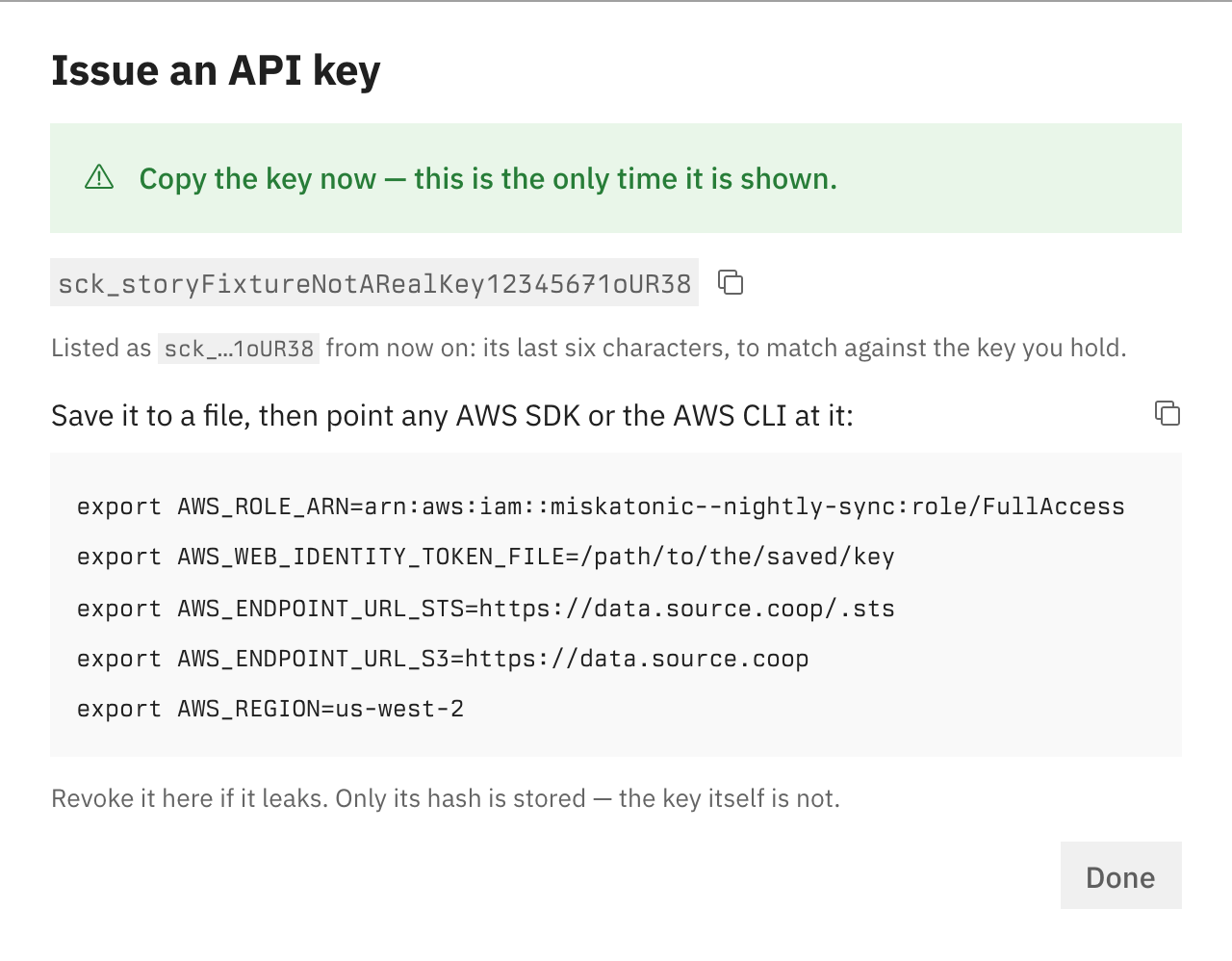
[IssueApiKeyDialog](https://source-coop-ui-git-feat-api-key-checksum-radiantearth.vercel.app/?path=/story/features-service-accounts-issueapikeydialog--default):
issue a key to see a 40-character key, listed "by its last six
characters".
## How you can test it
I ran these on the branch as pushed (8d0a99e):
- `npm run type-check` passes.
- `npx jest src/types/service-account-key.test.ts
src/lib/actions/service-account-keys.test.ts
src/components/features/service-accounts
src/app/api/v1/service-account-keys --forceExit`: 4 suites and 25 tests
pass. The new suite pins `apiKeyChecksum` to vectors computed
independently with Python's `zlib.crc32`, including a CRC above 2^31
(which a signed shift would get wrong) and one whose checksum keeps a
leading zero, and it refuses a cut-short key, a mistyped character, a
mistyped checksum, a character outside base62 and the old 47-character
format.
- `npm run lint` reports nothing in the files this PR touches.
- The screenshots are from a static Storybook build of this branch; the
dialog story issues `sck_storyFixtureNotARealKey12345671oUR38`, whose
checksum holds.
## Docs and ADRs
- ADR-013 states the key format and is revised in place for it by
source-cooperative/data.source.coop#242, since nothing implementing it
has shipped.
- source-cooperative/docs.source.coop#37, the automated-access guide,
now says what the proxy's new "API key is malformed; check that it was
copied whole" error means.
## Related
Part of #491 and #561. The same format is checked by
source-cooperative/data.source.coop#235 (proxy),
source-cooperative/source-coop-cli#20 (CLI) and #581 (revocation routes
and GitHub's secret-scanning endpoint), which also documents what to
send GitHub to enroll.
🤖 Generated with [Claude Code](https://claude.com/claude-code)
https://claude.ai/code/session_01R1eiTse4416N6uTgAy4Ddd
---------
Co-authored-by: Claude Opus 5.5 <noreply@anthropic.com>
## What I'm changing

Bumps multistore from 0.7.2 to 0.8.0 (developmentseed/multistore#153),
which answers `GetCallerIdentity`.
`aws-actions/configure-aws-credentials`, the step source.coop's settings
page hands out, makes that call after the exchange to check the
credentials it exports, so until now the step failed after a successful
exchange. The call needs no new routing here: it is answered by the STS
handler this Worker already mounts with `with_sts("/.sts", …)`, which in
0.8.0 serves `/.sts/` too and verifies SigV4 over the path the client
signed, so the existing `/.sts/` → `/.sts` rewrite doesn't break the
signature.

What 0.8.0 asked of this repo:

- **`RoleConfig.subject_conditions` is `["*"]`.** In 0.8.0 an empty list
accepts no subject (developmentseed/multistore#146), which would refuse
every person. Any subject is right here: a person's token names the
person, and a platform token acts only as an account that trusts its
subject (ADR-014).
- **`RoleConfig.allow_missing_exp_from` is empty**, so every issuer must
set `exp`. Ory always does; API keys never reach `verify_token`.
- `mint_temporary_credentials` returns a `Result`, and
`BucketConfig::backend_type` is an enum
(developmentseed/multistore#155), parsed from the backend string
`backend_options` already produces (`s3`/`az`/`gcs`, which its `FromStr`
accepts).

The README's paragraph saying the action fails now says it works.

## Decisions to flag

- **#237's own `exp` check in `platform::subject` stays.** #237 said to
drop it with this bump, since multistore now requires `exp` for every
issuer this Role trusts. It is redundant but harmless, and removing a
security check plus its test is better done as its own reviewed change
than inside a dependency bump.
- **`GetCallerIdentity`'s `Account` is multistore's fixed synthetic
id**, not the service account that #223's 2026-09-23 comment asked for.
`Arn` and `UserId` do carry the Role and the account (the credentials'
source identity). The action only needs the call to succeed, so this
doesn't block the workflow; making `Account` the service account is an
upstream change in multistore if we want the action's `aws-account-id`
output to mean something.

## Testing

- `cargo fmt --check`, `cargo clippy --target wasm32-unknown-unknown --
-D warnings`, `cargo check --target wasm32-unknown-unknown` and `cargo
test` pass locally (the pre-push hook).
- Not run locally: the Python integration tests and a real
`configure-aws-credentials` run. CI's integration job runs the former on
this PR's preview; the latter is the functional test for #223 once this
deploys.

## Docs and ADRs

ADR-014 says the proxy answers `GetCallerIdentity` "once
developmentseed/multistore#126 lands"; this PR is that landing and
implements the decision, so the ADR still holds. ADR-004 already lists
`configure-aws-credentials` as a supported client. docs.source.coop: the
GitHub Actions section of the automated-access guide
(source-cooperative/docs.source.coop#37) is waiting on this.

Part of #223: it is done once a workflow in an unrelated repository
writes with only its ambient token, against a deployment. Upstream:
developmentseed/multistore#126, developmentseed/multistore#146,
developmentseed/multistore#153. Epic:
source-cooperative/source.coop#491.

🤖 Generated with [Claude Code](https://claude.com/claude-code)

Co-authored-by: Claude Opus 5.5 <noreply@anthropic.com>
…#614) GitHub signs Actions tokens for repositories created after July 2026 (and any that opted in) with immutable subjects, `repo:owner@id/repo@id:…`, and a service account's trust has to match that form exactly. Nobody knows their repository's numeric ids, so today the trust form takes `owner/repo`, the exchange is refused, and the uniform refusal doesn't say why. This came up on the first real GitHub Actions run against staging: `alukach/source-coop-upload-test` is new, so its tokens say `repo:alukach@897290/source-coop-upload-test@1400565438:ref:refs/heads/main`. Part of #491. ## What `GithubWorkflowFields`, the fields behind both the create form and the "Trust a GitHub workflow" dialog: - **Public repository.** When the Repository field holds `owner/repo`, the form asks `https://api.github.com/repos/{owner}/{repo}` once typing stops (400 ms) and offers the immutable name, `octocat@583231/Hello-World@1296269`, with **Use it**, which puts it in the field. The names come from GitHub's answer, so their case is GitHub's too. - **Private or missing repository.** The anonymous API answers 404, so the form gives the command that prints the name for anyone who can see the repository: `gh api repos/{owner}/{repo} --jq '"\(.owner.login)@\(.owner.id)/\(.name)@\(.id)"'`. Run against the upload-test repository it prints `alukach@897290/source-coop-upload-test@1400565438`. - A value already in the immutable form isn't looked up. - "immutable subjects", in the Repository help and the private-repository line, links to [GitHub's changelog](https://github.blog/changelog/2026-04-23-immutable-subject-claims-for-github-actions-oidc-tokens/), which says what the form is and which repositories get it: those created, renamed or transferred after July 15, 2026, plus any that opt in. The screenshots below predate the link, which adds only an underline. **Decisions to flag:** - **It offers, it doesn't switch.** Whether a repository's tokens carry the immutable form is its `actions/oidc/customization/sub` setting, which only its admins can read, even on a public repository. The creation date would only be a guess, so the form names the July 2026 default and leaves the choice to the user. - **Asked from the browser, not the server.** The anonymous limit (60 requests an hour) is then the viewer's own rather than shared by every Vercel function, and the server needs no new code. The app sets no Content-Security-Policy, so nothing blocks the call. It does tell GitHub, from the viewer's IP, which repository name was typed, which is GitHub's own data. - **No GitHub sign-in for private repositories.** That would mean a GitHub OAuth app and a token held for the session. The `gh` one-liner covers it for anyone who can already see the repository. ## Stories On this branch's deploy: - `GithubWorkflowFields` › **PublicRepository**: https://source-coop-ui-git-feat-github-immutable-re-82950d-radiantearth.vercel.app/?path=/story/features-service-accounts-githubworkflowfields--public-repository (asks GitHub for real, so it shows `octocat/Hello-World`'s actual ids) - `GithubWorkflowFields` › **PrivateRepository**: https://source-coop-ui-git-feat-github-immutable-re-82950d-radiantearth.vercel.app/?path=/story/features-service-accounts-githubworkflowfields--private-repository 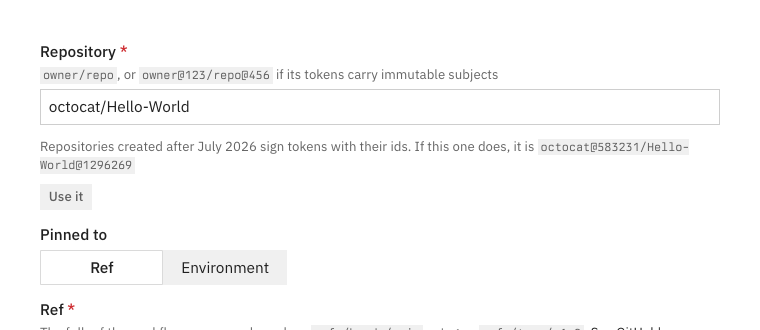 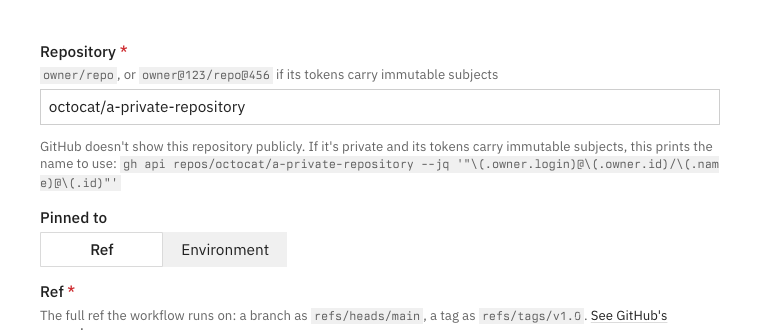 ## Testing - `GithubWorkflowFields.test.tsx` (new, `fetch` mocked): a public repository's immutable name is offered and **Use it** sends it through `onChange`; a 404 shows the `gh` command; a value already immutable isn't looked up. - `src/stories.smoke.test.tsx`: 193 pass, the two new stories included. - `npm run type-check` and `next lint` on the changed files are clean. - Screenshots above are from a local Storybook against the real GitHub API. The `gh` command was run against `alukach/source-coop-upload-test` and prints its token's subject prefix. ## Docs and ADRs Checked ADR-014 (source-cooperative/data.source.coop): it says a trust names a subject exactly, in either form, and this changes only how the form helps fill one in, so it still holds. docs.source.coop: the automated-access guide (source-cooperative/docs.source.coop#37) has its GitHub Actions section marked "coming soon", so no existing page describes this field. That section should mention the immutable form when it's written. 🤖 Generated with [Claude Code](https://claude.com/claude-code) --------- Co-authored-by: Claude Opus 5.5 <noreply@anthropic.com>
…ice account UI

GitHub Actions trust shipped in data.source.coop#237 (which implements #222 and #223), so the "coming soon" note becomes instructions: trusting a workflow, the step from Example usage, why a job with an environment or a pull_request trigger carries a different subject, role-duration-seconds for long jobs, and the AccessDenied a refused sign-in gets. The API-key section now says how to choose ReadOnly, and that any other role name is refused. The create and issue steps follow the UI on source.coop main: sign-ins are added under "How software signs in" at creation or from "Add sign-in" under "Signs in with", and the variables, Change expiry and Revoke live in each row's menu. The stop table gains removing a workflow, and disabling now names workflow sign-ins too (authenticateWithOidcToken refuses a disabled account).

Co-Authored-By: Claude Opus 5.5 <noreply@anthropic.com>
Claude-Session: https://claude.ai/code/session_014rVE6YPLaG5BrUoC76r3fp
The example now matches the order source.coop prints (source-cooperative/source.coop#619): region, S3 endpoint, STS endpoint, role, key file. The table below it follows.

Co-Authored-By: Claude Opus 5.5 <noreply@anthropic.com>
Claude-Session: https://claude.ai/code/session_014rVE6YPLaG5BrUoC76r3fp
Upload Your Data becomes a sidebar category. Its index keeps /data-upload with what every method shares (how the proxy works, where to upload, the controls) and a table for choosing a method. Option 1 becomes Upload in the Browser (/upload-in-the-browser), Option 2 becomes Upload with the Source CLI (/upload-with-the-cli) with View Credentials as its no-CLI fallback, and Automated Access moves in as With a Service Account, keeping /automated-access. The index carries HTML anchors for the old Option headings and the CLI heading Access Data linked to, so existing links still land. Content moves unchanged apart from headings and a sentence of glue per page.

Co-Authored-By: Claude Opus 5.5 <noreply@anthropic.com>
Claude-Session: https://claude.ai/code/session_014rVE6YPLaG5BrUoC76r3fp
 alukach
changed the title
alukach
changed the title
…sabled

The data proxy verifies signatures with whatever region the client signed for and uses it for nothing else, but many SDKs refuse to sign without one, so both credential pages now say to set it anyway. Access Data's closing section said uploading through the proxy was disabled, which the Upload Your Data pages contradict; it is gone.

Co-Authored-By: Claude Opus 5.5 <noreply@anthropic.com>
Claude-Session: https://claude.ai/code/session_014rVE6YPLaG5BrUoC76r3fp
## What

An API key's **Example usage** now lists its variables from where
requests go to how they sign in:

```bash
export AWS_REGION=us-west-2
export AWS_ENDPOINT_URL_S3=https://data.source.coop
export AWS_ENDPOINT_URL_STS=https://data.source.coop/.sts
export AWS_ROLE_ARN=arn:aws:iam::your-org--nightly-sync:role/FullAccess
export AWS_WEB_IDENTITY_TOKEN_FILE=/path/to/the/saved/key
```

It used to start with the role and key file and end with the region.
Only the order changes; every value is the same. `apiKeyEnvironment` is
the one place it's built, so the key row's dialog and the story both
follow.

Story: [ExampleUsage /
ApiKey](https://source-coop-ui-git-feat-api-key-env-order-radiantearth.vercel.app/?path=/story/features-service-accounts-exampleusage--api-key).
The snippet above is the whole visual change, so there's no screenshot.

## Testing

- `service-account-usage.test.ts` now pins the whole snippet with
`toBe`, where it used to check three lines with `toContain`, so the
order is tested. It passes.
- `npm run type-check` passes.

## Docs and ADRs

source-cooperative/docs.source.coop#37 documents this snippet on its
Automated Access page and now uses the same order. No ADR covers the
order.

🤖 Generated with [Claude Code](https://claude.com/claude-code)

https://claude.ai/code/session_014rVE6YPLaG5BrUoC76r3fp

Co-authored-by: Claude Opus 5.5 <noreply@anthropic.com>
…workflow's example (#616) "Example usage" on a trusted GitHub workflow handed out a fragment of a job: `env:` and `steps:` at column zero, with `permissions: { id-token: write }` left in a comment. It didn't drop into a workflow: at the top level `steps` is invalid, and pasted under `jobs:` the keys turn into jobs named `env` and `steps`, leaving the real job with nothing to run. That's what happened on the first hand-written workflow against staging. It also ignored which subject the trust names, so a trust pinned to an environment got an example whose token would carry the ref instead, and would be refused. Part of #491. ## What The dialog now has a switch between two forms, both naming the proxy once in `AWS_ENDPOINT_URL_S3` and reading it back in the sign-in step's `with:` as `${{ env.AWS_ENDPOINT_URL_S3 }}` (for `audience`, and with `/.sts` appended for `sts-endpoint`): - **Full Workflow** (shown first): `githubWorkflow(proxyOrigin, accountId, subject)` returns a complete workflow to save under `.github/workflows/`. `AWS_ENDPOINT_URL_S3` is set in a workflow-level `env:`, so every step's S3 client reaches the proxy. One job, `data`, has `runs-on`, `permissions` (`id-token: write`, `contents: read`), the `configure-aws-credentials@v6` sign-in step, and a first `aws s3 ls s3://{owner}/` to show the credentials working. - **Step**: `githubWorkflowStep(proxyOrigin, accountId, subject)` returns the sign-in step alone, for a workflow that already exists, with `AWS_ENDPOINT_URL_S3` set in the step's own `env:`. A step's `env` reaches only that step, so two comments above it say what the job around it needs: `id-token: write` (plus the environment, for a trust pinned to one), and `AWS_ENDPOINT_URL_S3` on the job for later steps to reach the proxy. Both forms are built from one shared `signInStep`. Either way: - **A trust pinned to an environment** puts `environment:` on the job (JSON-quoted, since an environment name may hold a space). Without it GitHub puts the ref in the token's subject, and the trust doesn't match. - **A trust pinned to a ref** says on the `on: workflow_dispatch` line which ref to run it from (full workflow only). `ExampleUsage` takes `code` as before, or a map of labelled forms, in which case a `SegmentedControl` above the code chooses between them and the copy button takes whichever is showing. `ServiceAccountDetail` passes both forms for each trust, and the intro now reads "In the repository `{subject}` names, save the full workflow under `.github/workflows/`, or add the step to a job of your own:". ## Stories On this branch's deploy: - `ExampleUsage` › **GithubWorkflow** (opens on Full Workflow): https://source-coop-ui-git-fix-github-workflow-example-radiantearth.vercel.app/?path=/story/features-service-accounts-exampleusage--github-workflow - `ExampleUsage` › **GithubWorkflowStep** (new, opens on Step): https://source-coop-ui-git-fix-github-workflow-example-radiantearth.vercel.app/?path=/story/features-service-accounts-exampleusage--github-workflow-step - `ExampleUsage` › **GithubWorkflowInAnEnvironment** (new): https://source-coop-ui-git-fix-github-workflow-example-radiantearth.vercel.app/?path=/story/features-service-accounts-exampleusage--github-workflow-in-an-environment - `ExampleUsage` › **Mobile**: https://source-coop-ui-git-fix-github-workflow-example-radiantearth.vercel.app/?path=/story/features-service-accounts-exampleusage--mobile 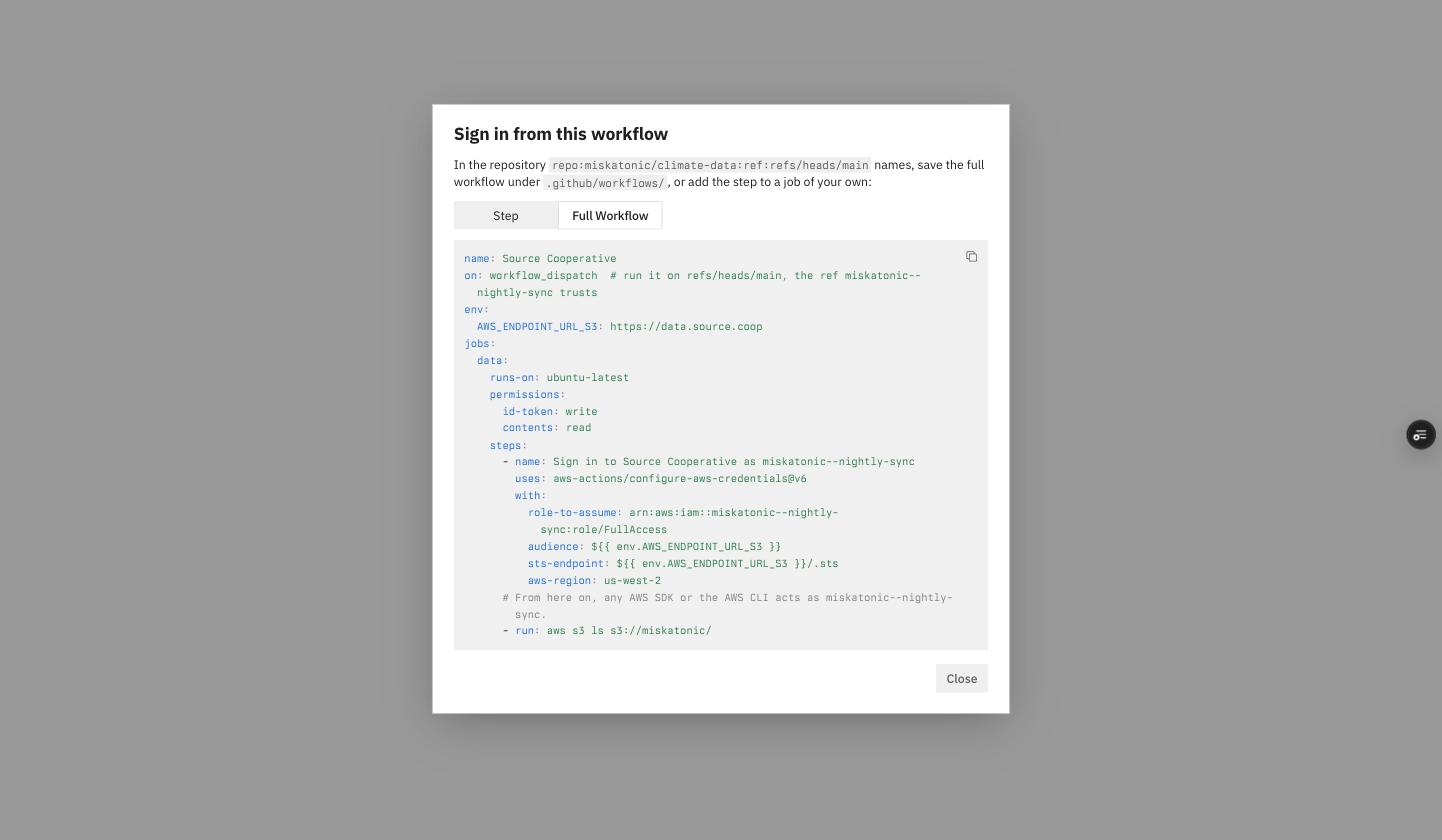 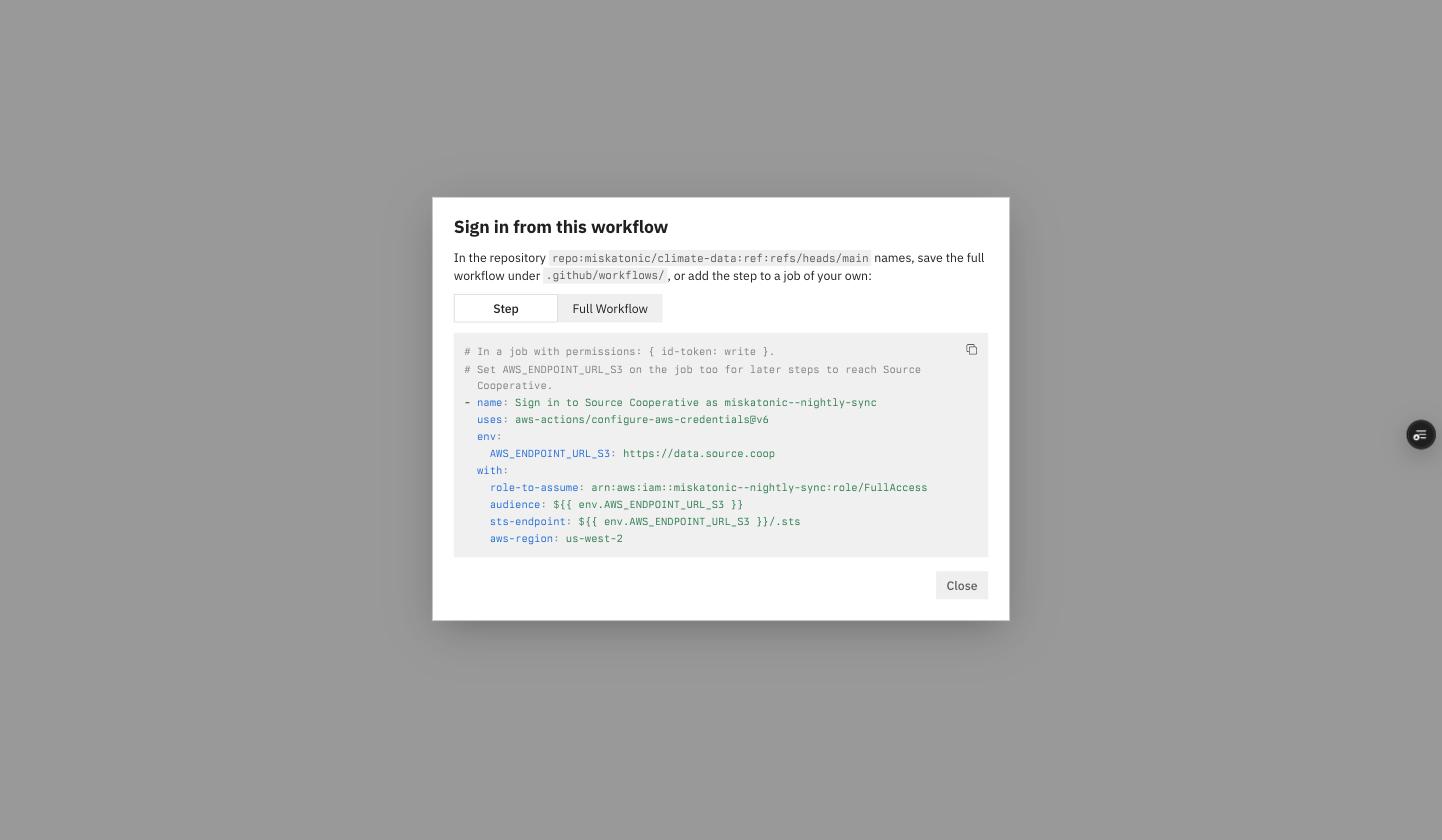 ## Testing - `service-account-usage.test.ts`: the workflow sets `AWS_ENDPOINT_URL_S3` in a top-level `env` and has one job holding `runs-on`, `permissions` with `id-token: write` and the sign-in step, nested where GitHub reads them (asserted on the exact indented lines, since nesting is the bug); `with:` reads `${{ env.AWS_ENDPOINT_URL_S3 }}`; a ref trust adds no `environment`, while an environment trust puts it on the job. The step stands alone with `env` beside `with`, and names the environment in its comment when the trust is pinned to one. 6 pass. - Once, outside the suite: both forms for an environment named `prod west` parsed with `js-yaml`: the workflow's top-level `env`, the job's `environment` and the step's `with`, and the step's own `env` and `with`. - `src/stories.smoke.test.tsx` 195 pass; `npm run type-check` is clean. - Checked on the branch deploy: both forms render, and the switch changes the code shown (screenshots above). - Not run: either form in a real repository. On staging it still needs source-cooperative/data.source.coop#248 deployed, since `configure-aws-credentials` checks the credentials with `GetCallerIdentity`. That `with:` can read a step's own `env` comes from GitHub's documented context availability (`env` is available in `jobs.<job_id>.steps.with`), not from a run. ## Docs and ADRs Checked ADR-014 (source-cooperative/data.source.coop): the step and the `RoleArn` it names are unchanged, so it still holds. docs.source.coop: the automated-access guide (source-cooperative/docs.source.coop#37) has its GitHub Actions section marked "coming soon", and should use this file when it's written. 🤖 Generated with [Claude Code](https://claude.com/claude-code) --------- Co-authored-by: Claude Opus 5.5 <noreply@anthropic.com>

|
For the deprecated old Option 3 "trusting an IAM role in the uploader's own AWS account to write straight to Source's bucket", it seems we will need to support existing users until they transition to the "automated access". Should we keep that instructions around on a page, but not have it part of the docs navigation? |










There was a problem hiding this comment.
To support existing users, maybe this file should be left in place, but removed from the navigation.
Co-Authored-By: Claude Opus 5.5 <noreply@anthropic.com>
|
|
||
| Some software reaches Source Cooperative with nobody at the keyboard: a nightly | ||
| sync, a publishing pipeline, an instrument that uploads its readings. Give it a | ||
| **service account** and an **API key**. The AWS CLI and SDKs exchange the key |
There was a problem hiding this comment.
"and" -> "or" ?
(usually you should only need one)
| --- | ||
|
|
||
| Some software reaches Source Cooperative with nobody at the keyboard: a nightly | ||
| sync, a publishing pipeline, an instrument that uploads its readings. Give it a |
There was a problem hiding this comment.
"Give it a ..." sounds AI generated.
|
|
||
| Some software reaches Source Cooperative with nobody at the keyboard: a nightly | ||
| sync, a publishing pipeline, an instrument that uploads its readings. Give it a | ||
| **service account** and an **API key**. The AWS CLI and SDKs exchange the key |
There was a problem hiding this comment.
"exchange the key"?
What if you used a service account, instead of an API key?
| sync, a publishing pipeline, an instrument that uploads its readings. Give it a | ||
| **service account** and an **API key**. The AWS CLI and SDKs exchange the key | ||
| for short-lived credentials at the [data proxy](/data-proxy) and renew them on | ||
| their own, so nothing else has to run on the machine. |
There was a problem hiding this comment.
nothing else has to run on the machine
What is this referring to?
| [a key](#issue-a-key) for anything else. Both are optional here: you can add | ||
| either later. | ||
| 5. Under **What it can reach**, click **Grant a product**, choose a product and | ||
| **Read** or **Read and write**, and click the check mark. Repeat for each |
There was a problem hiding this comment.
click the check mark
What check mark? I see a "Grant" button.
This branch was successfully deployed
2 participants


What
Upload Your Data becomes a section with one page per way to upload, and the third of them is new:
The browser and CLI pages carry the old page's text across unchanged apart from headings and a sentence of glue each. The index keeps the shared parts: how the proxy works, where to upload, why the controls exist, and what not to do. It also carries HTML anchors for the old
#option-1-…,#option-2-…and#option-3-…headings, and for#get-credentials-with-the-source-cli-recommended, so links into the old page still land on it. Access Data's setup link now points at the CLI page. Nothing outside this repo links to these pages; source.coop links only the case studies.Automated Access (titled "With a Service Account" in the sidebar) is for software that reaches Source Cooperative with nobody at the keyboard. It covers what a service account is; creating one and granting it products, as the UI flow; issuing an API key (shown once) and the five variables the AWS CLI or an SDK needs to exchange it at the data proxy and refresh on its own, with AWS CLI and boto3 examples and their minimum versions; the refusal a revoked, expired or unknown key gets and the request id to quote to support, and the separate error for a key cut short or mistyped, which its checksum catches; keeping the key out of URLs and
aws --debugoutput; several keys per service account for rotation, and Change expiry; tools that keep their first credentials, so long transfers fail mid-flight; GDAL; revocation and disabling as the emergency stop, with their timings; revoking a key you found; and trusting a GitHub Actions workflow, with the step a job adds, the subject a run must carry, and the error a refused sign-in gets. It says how to chooseReadOnlyfor both kinds of sign-in.Upload Your Data's old Option 3 walked through trusting an IAM role in the uploader's own AWS account to write straight to Source's bucket. Service accounts supersede that flow, so it is gone; the index's table points at the service account page instead. Access Data gains one sentence pointing unattended software at service accounts, and loses its closing section saying uploads through the proxy are disabled, which this section contradicts. Both credential pages now say the proxy ignores
AWS_REGION(multistore verifies a signature with whatever region the client signed for) but that it should be set anyway, because many SDKs won't sign without one.Merge after both production releases. Everything this page documents is merged, but none of it is in production yet. source.coop production is v1.6.1 (Sep 24), which predates the service account UI and keys (source-cooperative/source.coop#567, source-cooperative/source.coop#570, source-cooperative/source.coop#580, source-cooperative/source.coop#581, source-cooperative/source.coop#596); it ships with release PR source-cooperative/source.coop#539. The data proxy's production is v2.3.4 (Jul 28), which serves only the
_defaultrole and has no API key or GitHub Actions exchange (source-cooperative/data.source.coop#235, source-cooperative/data.source.coop#236, source-cooperative/data.source.coop#237); it ships with release PR source-cooperative/data.source.coop#213. Until both land, every command on the page fails in production; on staging it all works today.Decisions to flag
arn:aws:iam::<service-account-id>:role/FullAccessandus-west-2, the form both snippets on source.coopmainprint (apiKeyEnvironmentandgithubWorkflowStepinsrc/lib/services/service-account-usage.ts). The roles are hardcoded in the proxy (feat(sts): serve the FullAccess and ReadOnly roles data.source.coop#236, ADR-014):FullAccessis everything the service account may do,ReadOnlyremoves writes and is enforced as a ceiling sealed into the session, and any other name is refused rather than mapped to a default. The UI never printsReadOnly, so the page says to swap the suffix._default, an alias ofFullAccessfor older clients, isn't mentioned. The ARN's account segment is ignored for an API key (the key names its account) but chooses the service account for a GitHub workflow, and the page says so in the GitHub section.port/cpl_aws.cpp, checked at 3.6.0, 3.12.0 and master) shows it is worse than that. GDAL never readsAWS_ENDPOINT_URL_STS; its STS root isCPL_AWS_STS_ROOT_URL, defaulting tohttps://sts.<AWS_REGION>.amazonaws.com. So on a machine with the five variables and no other credentials, GDAL 3.6 or later sends the key to AWS in a GET query string. The page says to setCPL_AWS_WEB_IDENTITY_ENABLE=NO(present since 3.6.0) wherever GDAL runs beside the variables, and to replace a key GDAL has already seen. The coming-soon note for the Source CLI (Unattended refresh: exchange an API key without a browser and keep the token file fresh source-coop-cli#17) names GDAL 3.12, the first release that readscredential_processand refreshes it on expiry.AWS_*values, or the same values in a tool's own settings), because that is where the mid-transfer failure is certain. GDAL 3.12+ withcredential_processrefreshes, and so can recent DuckDB. The failure is named as the proxy returns it:ExpiredToken, HTTP 403 (multistore 0.7.2).credential_chainisn't recommended with a key. The page says DuckDB reads a secret's credentials atCREATE SECRETand suggestsCREATE OR REPLACE SECRETbetween batches. It doesn't suggestPROVIDER credential_chainwith the five variables. Whether DuckDB's bundled AWS C++ SDK sends that exchange toAWS_ENDPOINT_URL_STSdepends on its version: the older internal STS client hard-codessts.<region>.amazonaws.com, while the CRT-based provider reads an endpoint override. If it doesn't, the key goes to AWS. Verifying that is Verify an unmodified AWS SDK acquires and refreshes credentials from the environment alone data.source.coop#229's work. rclone likewise appears only in the fixed-credentials framing.STS_MAX_SESSION_DURATION_SECS = "43200"in production on feat(sts): exchange opaque API keys at /.sts by hash lookup data.source.coop#235's branch.POST https://source.coop/api/v1/service-account-keys/revocationslands with feat(accounts): revoke leaked API keys via self-revoke and GitHub secret scanning source.coop#581. It takes the key in a JSON body and answers 204 for any well-formed key. Automatic revocation of keys pushed to public GitHub also lands with feat(accounts): revoke leaked API keys via self-revoke and GitHub secret scanning source.coop#581, but it needs GitHub partner registration, so the page says only that it is planned.PLATFORM_ISSUERSadmits GitHub tokens with audiencehttps://data.source.coop, which is what the snippet sends. The section follows the UI on source.coopmain(Add sign-in → GitHub workflow, Pinned to Ref or Environment, Trust it, Example usage). It flags three subject mismatches: a job withenvironment:carries the environment subject,pull_requestruns can't be trusted (the UI accepts only ref and environment subjects), and repositories created after July 2026 carry the immutableowner@id/repo@idform. It also coversrole-duration-secondsup to 43200, since the action doesn't renew credentials mid-job. The refusal text is the proxy README's singleAccessDeniedfor every platform-token refusal. "Disabling stops workflow sign-ins" relies onauthenticateWithOidcTokenrefusing a disabled account (src/lib/api/oidc.ts), which is how the proxy's trust lookup authenticates.main. Since the page was first written, the create form gained Add a GitHub workflow and Add an API key; the detail page groups both under Signs in with behind Add sign-in; and a key's variables, Change expiry and Revoke moved into each row's menu. The steps say so./tools/iam-policy-wizardand the internal/tools/bucket-policy-wizardserved the superseded Option 3 flow. Nothing in the docs links to them now, and the IAM wizard's intro still sends readers to Upload Your Data "for the full walkthrough". Whether to retire them depends on whether anyone is still onboarded through IAM roles, so that is a separate change.How I tested it
docusaurus build(Docusaurus 3.10.2) succeeds with the site'sonBrokenLinks: 'throw'and no broken-link or broken-anchor warnings, rebuilt at f024ee8. In the output, the four pages render at their slugs, the sidebar shows the Upload Your Data category with its three pages, and/data-uploadcarries all five anchors that older links use. The API-key variables follow the order fix(accounts): order an API key's variables from where to how source.coop#619 prints. The page renders at/automated-access, and#github-actionsand#issue-a-keyresolve on/automated-access. As before, the build ran against the main checkout's install through a symlink (the disk is nearly full), withDOCUSAURUS_NO_PERSISTENT_CACHE=1and the output written outside the repo; the symlink is removed.mainfor the roles and the platform-token path; and the UI labels on source.coopmainat 8699c198.Docs and ADRs
This is the docs half of source-cooperative/source.coop#567, source-cooperative/source.coop#570, source-cooperative/source.coop#580, source-cooperative/source.coop#581 and source-cooperative/source.coop#596, and source-cooperative/data.source.coop#235, source-cooperative/data.source.coop#236 and source-cooperative/data.source.coop#237. I checked ADR-013 as revised (source-cooperative/data.source.coop#234) and ADR-014 (source-cooperative/data.source.coop#232). The page describes what they decide: the five variables, a key only in a request body, one refusal carrying a request id, revocation and workflow removal within the 60-second cache, disabling as the emergency stop (writes within a minute, restricted reads within five), and
FullAccess/ReadOnly. Neither needs a change. The other Using Source pages (Create an Account, Create a Data Product, Bring Your Own Bucket) still hold.Related
Part of #34. It isn't
Closes: the GDAL setup still waits on source-cooperative/source-coop-cli#17. GitHub Actions no longer waits on anything. #32 ("Document unattended credential acquisition") covers the same ground and looks like a duplicate of #34; I left it untouched. Part of source-cooperative/source.coop#491.🤖 Generated with Claude Code
https://claude.ai/code/session_01R1eiTse4416N6uTgAy4Ddd
https://claude.ai/code/session_014rVE6YPLaG5BrUoC76r3fp