
Stop wrestling with OpenAPI specs — SpecLynx OpenAPI Toolkit delivers an effective way to author and manage API specs, bringing ease, accuracy, and power directly to your VS Code workflow.




📖 Documentation: speclynx.com/openapi-toolkit
🛍️ Install: VS Code Marketplace · Open VSX (for VS Code–compatible editors like VSCodium/Cursor)
🚀 Releases: GitHub releases
🧾 Changelog: VS Code Marketplace changelog
SpecLynx OpenAPI Toolkit adds semantic editing, validation/linting, preview, and utility commands for OpenAPI in VS Code — on desktop and on the web (vscode.dev / github.dev / Codespaces).
- VS Code 1.75.0+
- Node.js 16.14.2+ (VS Code desktop only)
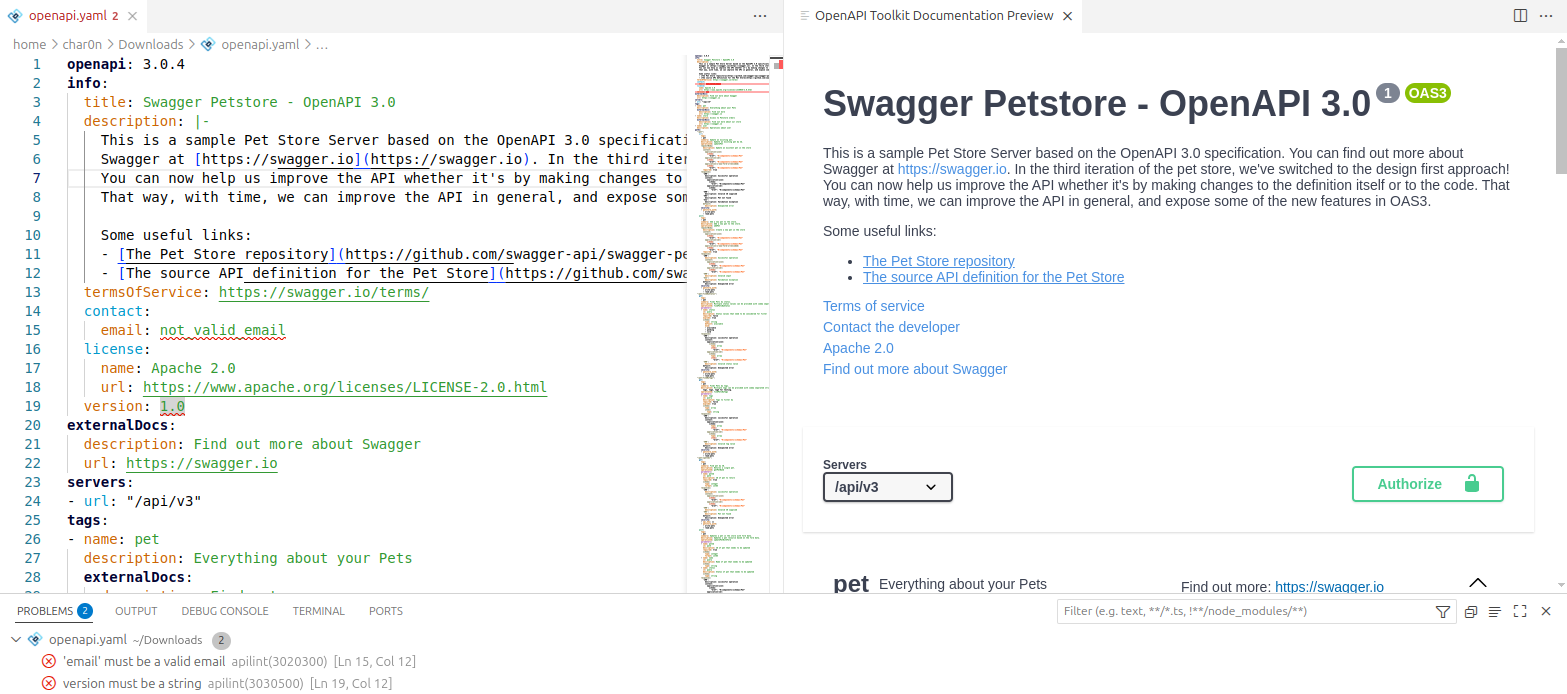
Works with OpenAPI specs in YAML (.yaml, .yml) and JSON (.json).
- Install the extension from the VS Code Marketplace (or Open VSX).
- Open an OpenAPI file.
- Open the Command Palette (
Ctrl+Shift+P) and run:- OpenAPI Toolkit: Show API Document Preview
- OpenAPI Toolkit: Format Document
- OpenAPI Toolkit: Convert to YAML / OpenAPI Toolkit: Convert to JSON
Choose the preview renderer in settings (Scalar or Swagger UI). See the documentation for configuration details: speclynx.com/openapi-toolkit.
- Hover documentation for OpenAPI keywords and schema elements (incl.
$reftargets) - Semantic autocompletion with inline docs and context-aware suggestions
$refsupport: completion + preview + navigation across files- Navigation & outline: Go to Definition / Find References + Document Symbols
- Live API docs preview inside VS Code
- Renderers: Scalar API Reference (default) or Swagger UI
- Interactive experience (auth, server selection, try-it / execute requests where supported)
- Format Document for OpenAPI YAML/JSON (respects VS Code formatting settings)
- Convert JSON ↔ YAML (creates a new file with the target extension)
- OpenAPI validation with editor diagnostics
- Modes (can be combined):
- JSON Schema validation
- Spectral validation/linting (custom rulesets)
- Semantic validation (deep checks beyond schema)
- Semantic linting (custom rules targeting semantic elements / JSONPath)
- Configure Spectral rulesets via workspace files or settings
- Configure SpecLynx semantic rules via workspace files or settings
- Optional command to select a ruleset file (see docs)
This extension supports the following OpenAPI versions:
Complete documentation (configuration, settings, commands, rulesets, troubleshooting, and examples) is available at speclynx.com/openapi-toolkit.
This extension does not collect telemetry.
Report bugs or request features on GitHub Issues.
Licensed under the Apache License 2.0. See LICENSE.
The same language features are available to other editors through the standalone
@speclynx/api-language-server. Its speclynx-lsp --stdio
command speaks the Language Server Protocol and does not require VS Code.
The first npm publication is planned for 1.6.0; until then use the
local build instructions.
The SpecLynx LSP plugin integrates the server with Claude Code. The marketplace catalog is initially empty. After the first server release and plugin verification, install it with:
/plugin marketplace add speclynx/vscode-openapi-toolkit
/plugin install speclynx-lsp@speclynx
See CONTRIBUTING.md for development, testing and local plugin use, and RELEASE.md for the release process.